
Payment terms
Set payment terms in bluprnts — how long customers take to pay and when you pay suppliers — so cash lands in the forecast when it really moves.
Payment terms decide when cash actually moves — how long your customers take to pay you, and how long you take to pay suppliers. bluprnts splits each across 30, 60 and 90 days, so revenue and costs land in cash on realistic timing rather than the instant they're booked.
Open the Payment terms settings#
In the left sidebar, select your company name at the bottom to open Company options, then choose Payment terms. Changes save automatically.
Debtor days#
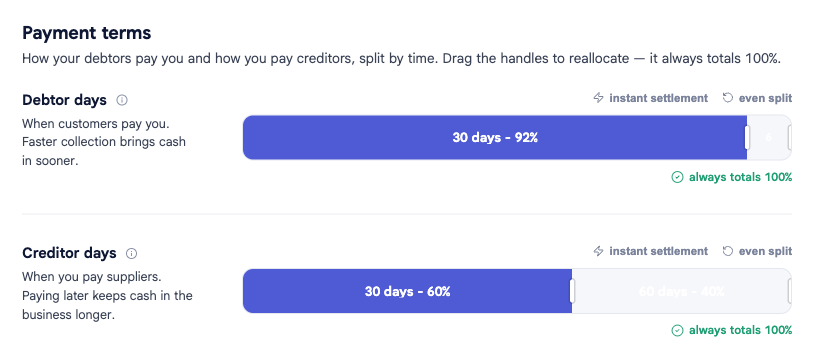
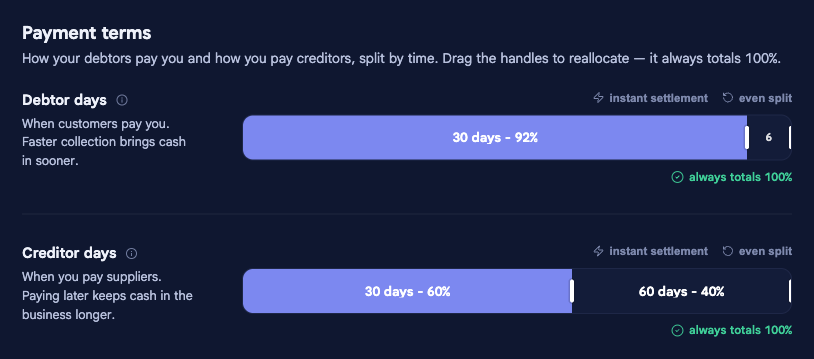
When your customers pay you. Drag the handles to split your customers across the 30-, 60- and 90-day buckets — the split always totals 100%. Faster collection brings cash in sooner.
Creditor days#
When you pay your suppliers. Split the same way. Paying later keeps cash in the business longer.
Shortcuts#
Two quick presets sit above each bar:
- Instant settlement — allocate 100% to the first bucket, for a cash or retail business paid up front.
- Even split — spread evenly across the three buckets.
Related#
- Opening position — invoices and bills already in flight settle on these terms.
- How forecasts are built — how timing turns profit into cash.